Skip to content

How can I edit what I receive in each Subscription refill?

When you’re enrolled in a Canopy Subscription we’ll automatically create orders for you on a repeating basis.

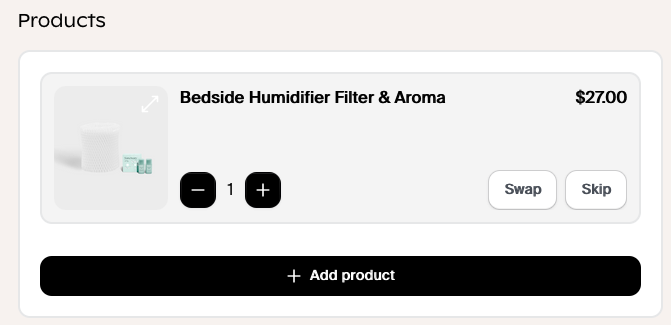
You can see what's included in all of our subscriptions here. To add an additional subscription, or to Swap between options, meaning to remove what you're receiving now and receive something else instead:

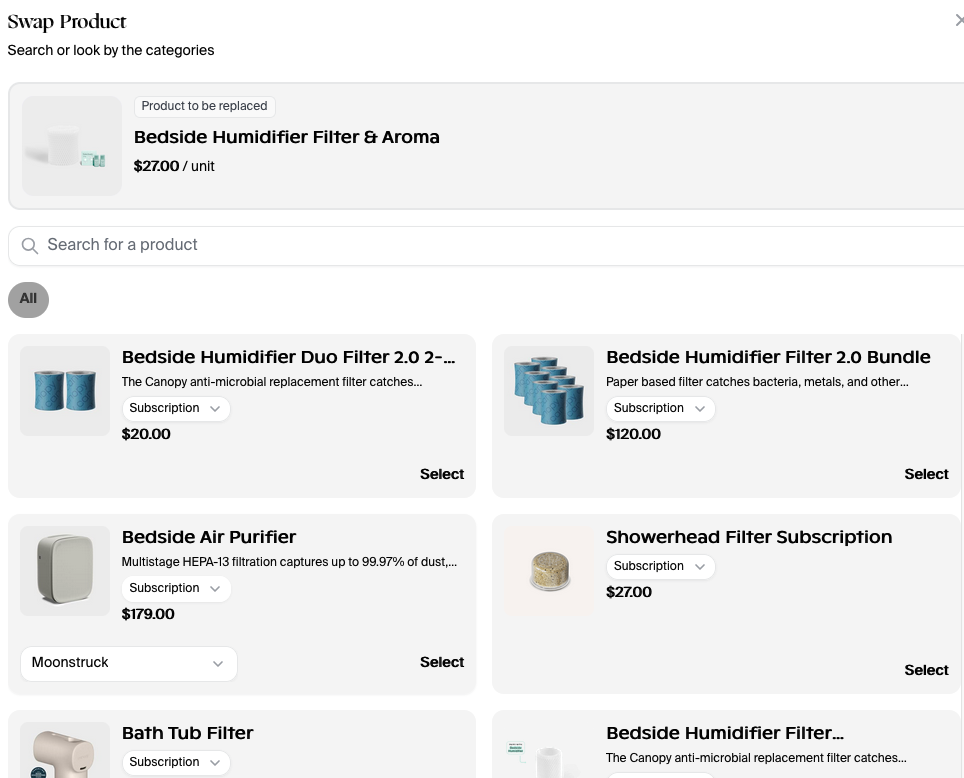
Go to your Account page, select "Swap" next to the Subscription you want to adjust.

You'll be shown the full list of Canopy products; devices and accessories.


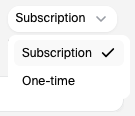
If you want to add a new device to your next order just make sure to select On -time from the dropdown
Hit "Select next" to the product you want to transition to, then 


To Add to your subscription, without removing your original refill, Select "Add Product" to start and follow the same steps as above.

Free Returns + Package Protection

Shop with peace of mind knowing that all eligible items in your order are protected against return fees, and covered if they are lost, stolen, or damaged in transit.

Free returns and exchanges

Return or exchange your device(s) without any extra hidden fees, like handling fees or restocking fees. (Final Sale items are not eligible for returns/exchanges)

Package Protection

Simply get a refund when you report your package as lost, stolen, or damaged in transit within 7 days of its scheduled delivery.


Some items may not be eligible for this service, such as items that are final sale. By opting out of this service you will be responsible for any return costs such as shipping labels, handling fees, or restocking fees. Additionally, your package won't be protected if it is lost, stolen, or damaged in transit. The price of this service includes a $1.98 flat fee, plus 2% of the cart total. In certain states, sales tax may also be included in the total. For more information, please read the Package Protection Terms and Conditions.