

Skip to content

How can I reactivate my subscription?

Welcome back to Canopy! We're so glad you've decided to reactivate your subscription! If you've previously had a subscription with us it's easy to turn it back on and start receiving accessories on a regular schedule again.

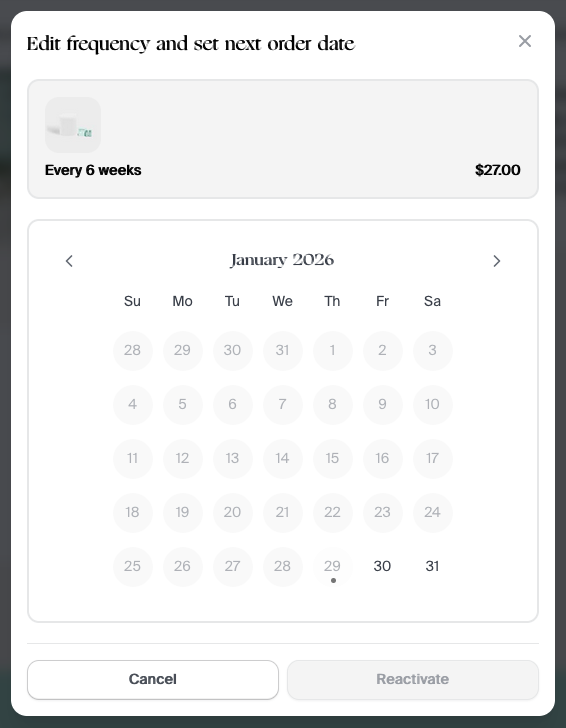
Simply login to your Account Page, scroll to the "Inactive Subscriptions" section, locate the subscription you want to turn back on and select "Reactivate."
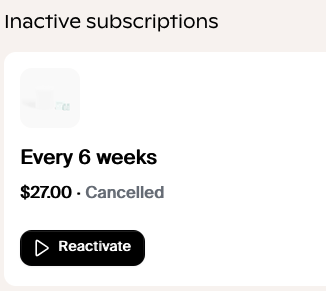

A calendar will pop up to ask when you want your next refill to be created. Select your preferred date and click "Reactivate."

Please note, if your former subscription was cancelled prior to August of 2024, you'll have to create a new subscription. Any past Canopy Credits will not be returned to your account, cancelling a subscription clears your credit count. Your new subscription will begin at Starter status.

Free Returns + Package Protection

Shop with peace of mind knowing that all eligible items in your order are protected against return fees, and covered if they are lost, stolen, or damaged in transit.

Free returns and exchanges

Return or exchange your device(s) without any extra hidden fees, like handling fees or restocking fees. (Final Sale items are not eligible for returns/exchanges)

Package Protection

Simply get a refund when you report your package as lost, stolen, or damaged in transit within 7 days of its scheduled delivery.


Some items may not be eligible for this service, such as items that are final sale. By opting out of this service you will be responsible for any return costs such as shipping labels, handling fees, or restocking fees. Additionally, your package won't be protected if it is lost, stolen, or damaged in transit. The price of this service includes a $1.98 flat fee, plus 2% of the cart total. In certain states, sales tax may also be included in the total. For more information, please read the Package Protection Terms and Conditions.